Monitor RHOAI usage with Cluster Observability Operator and Perses
Deploy the Cluster Observability Operator with its Perses UI plugin, then apply a PersesDashboard that surfaces Red Hat OpenShift AI workbench, pipeline server, and model-serving metrics directly in the OpenShift web console.
Prerequisites
- Red Hat OpenShift AI (RHOAI) is installed and at least one data science project exists (see RHOAI docs).
ocavailable in$PATHwithcluster-adminprivileges.
1. Enable User Workload Monitoring
User Workload Monitoring (UWM) is required so RHOAI components can expose metrics to the openshift-user-workload-monitoring Prometheus.
cat <<EOF | oc apply -f -
apiVersion: v1
kind: ConfigMap
metadata:
  name: cluster-monitoring-config
  namespace: openshift-monitoring
data:
  config.yaml: |
    enableUserWorkload: true
EOF
Wait until the UWM stack is ready:
oc rollout status statefulset/prometheus-user-workload -n openshift-user-workload-monitoring2. Install the Cluster Observability Operator
Create a Subscription in openshift-cluster-observability-operator to pull COO from the redhat-operators catalog:
cat <<EOF | oc apply -f -
apiVersion: operators.coreos.com/v1alpha1
kind: Subscription
metadata:
  name: cluster-observability-operator
  namespace: openshift-cluster-observability-operator
spec:
  channel: development <!-- VERIFY: confirm channel name in OperatorHub -->
  installPlanApproval: Automatic
  name: cluster-observability-operator
  source: redhat-operators
  sourceNamespace: openshift-marketplace
EOF
Confirm the operator pod reaches Running:
oc get pods -n openshift-cluster-observability-operator -l app.kubernetes.io/name=observability-operator3. Enable the Perses UI plugin
The UIPlugin resource instructs COO to deploy the Perses console plugin. Once active, PersesDashboard objects become navigable from the OpenShift web console under Observe → Dashboards.
cat <<EOF | oc apply -f -
apiVersion: observability.openshift.io/v1alpha1
kind: UIPlugin
metadata:
  name: dashboards
spec:
  type: Dashboards
EOF$namespace variable queries kube_namespace_labels with label_opendatahub_io_dashboard="true" to enumerate ODH-owned projects. That metric is only available on the platform Prometheus (openshift-monitoring). If Perses is configured with a single UWM datasource, switch to the fallback matcher kube_pod_labels{label_notebook_name!=""} defined in the dashboard’s variable comments.4. Apply the PersesDashboard
The manifest creates a six-section dashboard in the redhat-ods-monitoring namespace (created by RHOAI at install time). The sections are:
| Section | Panels |
|---|---|
| Overview | System health, deployed models, GPU utilization, request success rate |
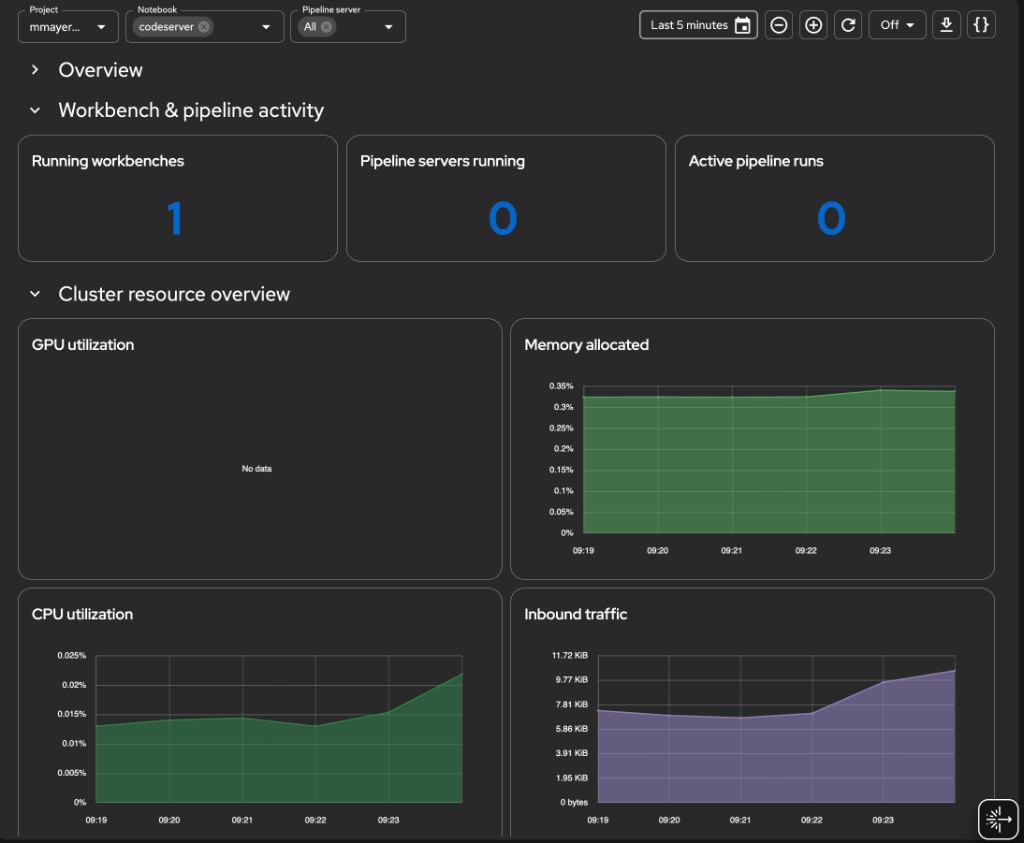
| Workbench & pipeline activity | Running workbenches, pipeline servers, active pipeline runs |
| Cluster resource overview | GPU / memory / CPU / inbound network time-series |
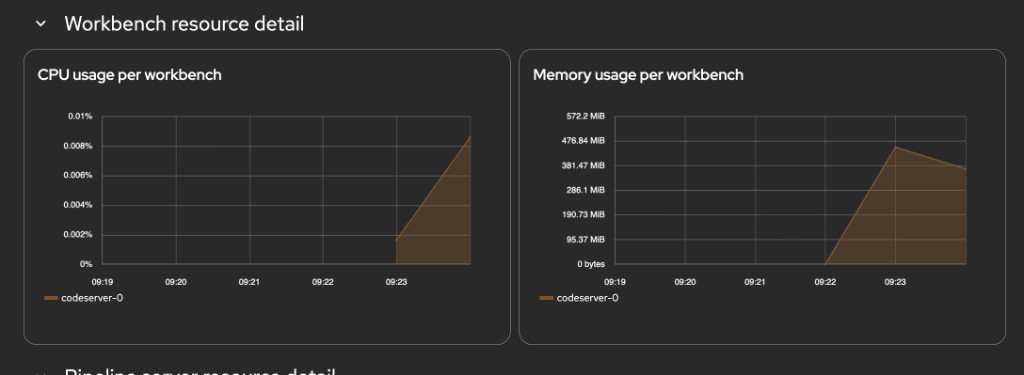
| Workbench resource detail | CPU and memory per workbench (filtered by $notebook) |
| Pipeline server resource detail | CPU, memory, and run activity per pipeline server |
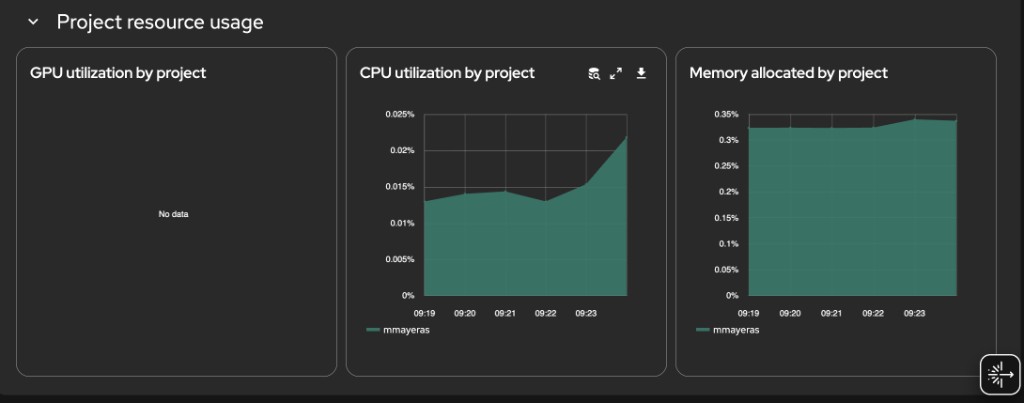
| Project resource usage | GPU, CPU, memory stacked by project |
cat <<'EOF' | oc apply -f -
apiVersion: perses.dev/v1alpha1
kind: PersesDashboard
metadata:
name: dashboard-rhoai-filters
namespace: redhat-ods-monitoring
spec:
display:
name: Cluster Details per project
duration: 1h
# ---------------------------------------------------------------------------
# Variables
# ---------------------------------------------------------------------------
# NAMESPACE GUARD STRATEGY
# ─────────────────────────
# Perses datasource is openshift-user-workload-monitoring (UWM). That
# Prometheus does not have kube_namespace_labels, so per-query joins on
# that metric are not possible.
#
# The ODH namespace allowlist is enforced at the variable level:
# - $namespace is populated from kube_namespace_labels via the PLATFORM
# Prometheus (openshift-monitoring), which does have that metric.
# - Every panel query uses {namespace=~"$namespace"} which at render
# time resolves to the ODH-only namespace list from the variable.
#
# If Perses uses a single datasource for both variables and panels, the
# $namespace variable will populate from UWM kube_namespace_labels — in
# that case fall back to the pod-label based matcher (see comment below).
# ---------------------------------------------------------------------------
variables:
# 1. Project / Namespace
- kind: ListVariable
spec:
name: namespace
display:
name: Project
description: Filter by RHOAI project
allowMultiple: false
allowAllValue: true
customAllValue: ".*"
defaultValue: "$__all"
plugin:
kind: PrometheusLabelValuesVariable
spec:
datasource:
kind: PrometheusDatasource
labelName: namespace
matchers:
# kube_namespace_labels exists in platform Prometheus.
# If this returns empty (UWM datasource), use the fallback below.
- kube_namespace_labels{label_opendatahub_io_dashboard="true"}
# Fallback: uncomment if above returns nothing
# - kube_pod_labels{label_notebook_name!=""}
# 2. Notebook — chained on $namespace
- kind: ListVariable
spec:
name: notebook
display:
name: Notebook
description: Filter by workbench
allowMultiple: true
allowAllValue: true
customAllValue: ".*"
defaultValue: "$__all"
plugin:
kind: PrometheusLabelValuesVariable
spec:
datasource:
kind: PrometheusDatasource
labelName: label_notebook_name
matchers:
- kube_pod_labels{namespace=~"$namespace", label_notebook_name!=""}
# 3. Pipeline server — chained on $namespace
- kind: ListVariable
spec:
name: pipeline_server
display:
name: Pipeline server
description: Filter by pipeline server (DSPA)
allowMultiple: true
allowAllValue: true
customAllValue: ".*"
defaultValue: "$__all"
plugin:
kind: PrometheusLabelValuesVariable
spec:
datasource:
kind: PrometheusDatasource
labelName: label_dspa
matchers:
- kube_pod_labels{namespace=~"$namespace", label_dspa!=""}
# ---------------------------------------------------------------------------
# Panels
# ---------------------------------------------------------------------------
panels:
# ── Overview stats ────────────────────────────────────────────────────────
systemHealth:
kind: Panel
spec:
display:
name: System health
plugin:
kind: StatChart
spec:
calculation: mean
format:
unit: percent-decimal
queries:
- kind: TimeSeriesQuery
spec:
plugin:
kind: PrometheusTimeSeriesQuery
spec:
datasource:
kind: PrometheusDatasource
query: >
count(max by (node) (kube_node_status_condition{condition="Ready",status="true"} == 1))
/ count(max by (node) (kube_node_status_condition{condition="Ready",status="true"}))
seriesNameFormat: System health
deployedModels:
kind: Panel
spec:
display:
name: Deployed models
plugin:
kind: StatChart
spec:
calculation: last-number
format:
unit: decimal
decimalPlaces: 0
queries:
- kind: TimeSeriesQuery
spec:
plugin:
kind: PrometheusTimeSeriesQuery
spec:
datasource:
kind: PrometheusDatasource
# Confirmed label: namespace (not exported_namespace)
query: >
count(
group by (model_name, namespace) (
vllm:num_requests_running{namespace=~"$namespace"}
)
)
seriesNameFormat: Deployed models
gpuUtilizationStat:
kind: Panel
spec:
display:
name: GPU utilization
plugin:
kind: StatChart
spec:
calculation: mean
format:
unit: percent
queries:
- kind: TimeSeriesQuery
spec:
plugin:
kind: PrometheusTimeSeriesQuery
spec:
datasource:
kind: PrometheusDatasource
query: avg(accelerator_gpu_utilization{exported_namespace=~"$namespace"})
seriesNameFormat: GPU usage
successRate:
kind: Panel
spec:
display:
name: Request success rate
plugin:
kind: StatChart
spec:
calculation: mean
format:
unit: percent-decimal
decimalPlaces: 1
queries:
- kind: TimeSeriesQuery
spec:
plugin:
kind: PrometheusTimeSeriesQuery
spec:
datasource:
kind: PrometheusDatasource
# finished_reason confirmed. Using rate() instead of
# increase() so the panel shows data even when requests
# are infrequent within the selected time window.
# Falls back to last known ratio using max_over_time if
# rate returns 0.
query: >
(
sum(rate(vllm:request_success_total{namespace=~"$namespace", finished_reason=~"stop|length"}[$__rate_interval]))
/
sum(rate(vllm:request_success_total{namespace=~"$namespace"}[$__rate_interval]))
)
or
(
sum(max_over_time(vllm:request_success_total{namespace=~"$namespace", finished_reason=~"stop|length"}[$__range]))
/
sum(max_over_time(vllm:request_success_total{namespace=~"$namespace"}[$__range]))
)
seriesNameFormat: Request success rate
# ── Workbench & pipeline activity ─────────────────────────────────────────
runningNotebooks:
kind: Panel
spec:
display:
name: Running workbenches
plugin:
kind: StatChart
spec:
calculation: last-number
format:
unit: decimal
decimalPlaces: 0
queries:
- kind: TimeSeriesQuery
spec:
plugin:
kind: PrometheusTimeSeriesQuery
spec:
datasource:
kind: PrometheusDatasource
query: >
count(
kube_pod_labels{
namespace=~"$namespace",
label_notebook_name!="",
label_notebook_name=~"$notebook"
}
* on(pod, namespace) group_left()
kube_pod_status_phase{phase="Running"}
) or vector(0)
seriesNameFormat: Running workbenches
runningPipelineServers:
kind: Panel
spec:
display:
name: Pipeline servers running
plugin:
kind: StatChart
spec:
calculation: last-number
format:
unit: decimal
decimalPlaces: 0
queries:
- kind: TimeSeriesQuery
spec:
plugin:
kind: PrometheusTimeSeriesQuery
spec:
datasource:
kind: PrometheusDatasource
query: >
count(
count by (namespace, label_dspa) (
kube_pod_labels{
namespace=~"$namespace",
label_dspa!="",
label_dspa=~"$pipeline_server"
}
* on(pod, namespace) group_left()
kube_pod_status_phase{phase="Running"}
)
) or vector(0)
seriesNameFormat: Pipeline servers
activePipelineRuns:
kind: Panel
spec:
display:
name: Active pipeline runs
plugin:
kind: StatChart
spec:
calculation: last-number
format:
unit: decimal
decimalPlaces: 0
queries:
- kind: TimeSeriesQuery
spec:
plugin:
kind: PrometheusTimeSeriesQuery
spec:
datasource:
kind: PrometheusDatasource
query: >
count(
kube_pod_labels{
namespace=~"$namespace",
label_workflows_argoproj_io_workflow!="",
label_dspa!="",
label_dspa=~"$pipeline_server"
}
* on(pod, namespace) group_left()
kube_pod_status_phase{phase="Running"}
) or vector(0)
seriesNameFormat: Active pipeline runs
# ── Cluster-wide area charts ──────────────────────────────────────────────
gpuUtilizationArea:
kind: Panel
spec:
display:
name: GPU utilization
plugin:
kind: TimeSeriesChart
spec:
visual:
areaOpacity: 0.6
connectNulls: false
display: line
lineWidth: 1.5
yAxis:
format:
unit: percent
min: 0
queries:
- kind: TimeSeriesQuery
spec:
plugin:
kind: PrometheusTimeSeriesQuery
spec:
datasource:
kind: PrometheusDatasource
query: avg(accelerator_gpu_utilization{exported_namespace=~"$namespace"})
seriesNameFormat: GPU usage
memoryUtilizationArea:
kind: Panel
spec:
display:
name: Memory allocated
plugin:
kind: TimeSeriesChart
spec:
visual:
areaOpacity: 0.6
connectNulls: false
display: line
lineWidth: 1.5
yAxis:
format:
unit: percent-decimal
min: 0
queries:
- kind: TimeSeriesQuery
spec:
plugin:
kind: PrometheusTimeSeriesQuery
spec:
datasource:
kind: PrometheusDatasource
query: >
sum(container_memory_working_set_bytes{namespace=~"$namespace", container!="", image!=""})
/ scalar(sum(node_memory_MemTotal_bytes))
seriesNameFormat: Memory allocated
cpuUtilizationArea:
kind: Panel
spec:
display:
name: CPU utilization
plugin:
kind: TimeSeriesChart
spec:
visual:
areaOpacity: 0.6
connectNulls: false
display: line
lineWidth: 1.5
yAxis:
format:
unit: percent-decimal
min: 0
queries:
- kind: TimeSeriesQuery
spec:
plugin:
kind: PrometheusTimeSeriesQuery
spec:
datasource:
kind: PrometheusDatasource
query: >
sum(node_namespace_pod_container:container_cpu_usage_seconds_total:sum_irate{namespace=~"$namespace"})
/ scalar(sum(kube_node_status_allocatable{resource="cpu"}))
seriesNameFormat: CPU usage
networkUtilizationArea:
kind: Panel
spec:
display:
name: Inbound traffic
plugin:
kind: TimeSeriesChart
spec:
visual:
areaOpacity: 0.6
connectNulls: false
display: line
lineWidth: 1.5
yAxis:
format:
unit: bytes
min: 0
queries:
- kind: TimeSeriesQuery
spec:
plugin:
kind: PrometheusTimeSeriesQuery
spec:
datasource:
kind: PrometheusDatasource
query: >
sum(rate(container_network_receive_bytes_total{namespace=~"$namespace"}[$__rate_interval]))
seriesNameFormat: Network
# ── Workbench resource detail ─────────────────────────────────────────────
notebookCpuByName:
kind: Panel
spec:
display:
name: CPU usage per workbench
plugin:
kind: TimeSeriesChart
spec:
legend:
mode: list
position: bottom
values: []
visual:
areaOpacity: 0.4
connectNulls: false
display: line
lineWidth: 1.5
yAxis:
format:
unit: percent-decimal
min: 0
queries:
- kind: TimeSeriesQuery
spec:
plugin:
kind: PrometheusTimeSeriesQuery
spec:
datasource:
kind: PrometheusDatasource
query: >
sum by (pod) (
node_namespace_pod_container:container_cpu_usage_seconds_total:sum_irate{
namespace=~"$namespace",
pod=~"($notebook)-0"
}
)
/ scalar(sum(kube_node_status_allocatable{resource="cpu"}))
seriesNameFormat: "{{pod}}"
notebookMemoryByName:
kind: Panel
spec:
display:
name: Memory usage per workbench
plugin:
kind: TimeSeriesChart
spec:
legend:
mode: list
position: bottom
values: []
visual:
areaOpacity: 0.4
connectNulls: false
display: line
lineWidth: 1.5
yAxis:
format:
unit: bytes
min: 0
queries:
- kind: TimeSeriesQuery
spec:
plugin:
kind: PrometheusTimeSeriesQuery
spec:
datasource:
kind: PrometheusDatasource
query: >
sum by (pod) (
container_memory_working_set_bytes{
namespace=~"$namespace",
pod=~"($notebook)-0",
container!="",
image!=""
}
)
seriesNameFormat: "{{pod}}"
# ── Pipeline server resource detail ───────────────────────────────────────
pipelineCpuByServer:
kind: Panel
spec:
display:
name: CPU usage per pipeline server
plugin:
kind: TimeSeriesChart
spec:
legend:
mode: list
position: bottom
values: []
visual:
areaOpacity: 0.4
connectNulls: false
display: line
lineWidth: 1.5
yAxis:
format:
unit: percent-decimal
min: 0
queries:
- kind: TimeSeriesQuery
spec:
plugin:
kind: PrometheusTimeSeriesQuery
spec:
datasource:
kind: PrometheusDatasource
query: >
sum by (pod) (
node_namespace_pod_container:container_cpu_usage_seconds_total:sum_irate{
namespace=~"$namespace",
pod=~"(ds-pipeline[^/]*-($pipeline_server)|mariadb-($pipeline_server)).*"
}
)
/ scalar(sum(kube_node_status_allocatable{resource="cpu"}))
seriesNameFormat: "{{pod}}"
pipelineMemoryByServer:
kind: Panel
spec:
display:
name: Memory usage per pipeline server
plugin:
kind: TimeSeriesChart
spec:
legend:
mode: list
position: bottom
values: []
visual:
areaOpacity: 0.4
connectNulls: false
display: line
lineWidth: 1.5
yAxis:
format:
unit: bytes
min: 0
queries:
- kind: TimeSeriesQuery
spec:
plugin:
kind: PrometheusTimeSeriesQuery
spec:
datasource:
kind: PrometheusDatasource
query: >
sum by (pod) (
container_memory_working_set_bytes{
namespace=~"$namespace",
pod=~"(ds-pipeline[^/]*-($pipeline_server)|mariadb-($pipeline_server)).*",
container!="",
image!=""
}
)
seriesNameFormat: "{{pod}}"
pipelineRunActivity:
kind: Panel
spec:
display:
name: Pipeline run activity
plugin:
kind: TimeSeriesChart
spec:
legend:
mode: list
position: bottom
values: []
visual:
areaOpacity: 0.6
connectNulls: false
display: bar
lineWidth: 1
yAxis:
format:
unit: decimal
min: 0
queries:
- kind: TimeSeriesQuery
spec:
plugin:
kind: PrometheusTimeSeriesQuery
spec:
datasource:
kind: PrometheusDatasource
query: >
count by (phase) (
kube_pod_status_phase{namespace=~"$namespace"}
* on(pod, namespace) group_left()
kube_pod_labels{
label_workflows_argoproj_io_workflow!="",
label_dspa!="",
label_dspa=~"$pipeline_server",
namespace=~"$namespace"
}
)
seriesNameFormat: "{{phase}}"
# ── Per-project breakdown ─────────────────────────────────────────────────
gpuUtilizationByProject:
kind: Panel
spec:
display:
name: GPU utilization by project
plugin:
kind: TimeSeriesChart
spec:
legend:
mode: list
position: bottom
values: []
visual:
areaOpacity: 1
connectNulls: false
display: line
lineWidth: 0.25
stack: all
yAxis:
format:
unit: percent
min: 0
queries:
- kind: TimeSeriesQuery
spec:
plugin:
kind: PrometheusTimeSeriesQuery
spec:
datasource:
kind: PrometheusDatasource
query: >
sum by (exported_namespace) (accelerator_gpu_utilization{exported_namespace=~"$namespace"})
/ scalar(count(accelerator_gpu_utilization))
seriesNameFormat: "{{exported_namespace}}"
cpuUtilizationByProject:
kind: Panel
spec:
display:
name: CPU utilization by project
plugin:
kind: TimeSeriesChart
spec:
legend:
mode: list
position: bottom
values: []
visual:
areaOpacity: 1
connectNulls: false
display: line
lineWidth: 0.25
stack: all
yAxis:
format:
unit: percent-decimal
min: 0
queries:
- kind: TimeSeriesQuery
spec:
plugin:
kind: PrometheusTimeSeriesQuery
spec:
datasource:
kind: PrometheusDatasource
query: >
sum by (namespace) (
node_namespace_pod_container:container_cpu_usage_seconds_total:sum_irate{namespace=~"$namespace"}
)
/ scalar(sum(kube_node_status_allocatable{resource="cpu"}))
seriesNameFormat: "{{namespace}}"
memoryUsageByProject:
kind: Panel
spec:
display:
name: Memory allocated by project
plugin:
kind: TimeSeriesChart
spec:
legend:
mode: list
position: bottom
values: []
visual:
areaOpacity: 1
connectNulls: false
display: line
lineWidth: 0.25
stack: all
yAxis:
format:
unit: percent-decimal
min: 0
queries:
- kind: TimeSeriesQuery
spec:
plugin:
kind: PrometheusTimeSeriesQuery
spec:
datasource:
kind: PrometheusDatasource
query: >
sum by (namespace) (
container_memory_working_set_bytes{namespace=~"$namespace", container!="", image!=""}
)
/ scalar(sum(node_memory_MemTotal_bytes))
seriesNameFormat: "{{namespace}}"
# ---------------------------------------------------------------------------
# Layouts
# ---------------------------------------------------------------------------
layouts:
- kind: Grid
spec:
display:
title: Overview
collapse:
open: true
items:
- x: 0
'y': 0
width: 6
height: 4
content:
'$ref': '#/spec/panels/systemHealth'
- x: 6
'y': 0
width: 6
height: 4
content:
'$ref': '#/spec/panels/deployedModels'
- x: 12
'y': 0
width: 6
height: 4
content:
'$ref': '#/spec/panels/gpuUtilizationStat'
- x: 18
'y': 0
width: 6
height: 4
content:
'$ref': '#/spec/panels/successRate'
- kind: Grid
spec:
display:
title: Workbench & pipeline activity
collapse:
open: true
items:
- x: 0
'y': 0
width: 8
height: 4
content:
'$ref': '#/spec/panels/runningNotebooks'
- x: 8
'y': 0
width: 8
height: 4
content:
'$ref': '#/spec/panels/runningPipelineServers'
- x: 16
'y': 0
width: 8
height: 4
content:
'$ref': '#/spec/panels/activePipelineRuns'
- kind: Grid
spec:
display:
title: Cluster resource overview
collapse:
open: true
items:
- x: 0
'y': 0
width: 12
height: 8
content:
'$ref': '#/spec/panels/gpuUtilizationArea'
- x: 12
'y': 0
width: 12
height: 8
content:
'$ref': '#/spec/panels/memoryUtilizationArea'
- x: 0
'y': 8
width: 12
height: 8
content:
'$ref': '#/spec/panels/cpuUtilizationArea'
- x: 12
'y': 8
width: 12
height: 8
content:
'$ref': '#/spec/panels/networkUtilizationArea'
- kind: Grid
spec:
display:
title: Workbench resource detail
collapse:
open: true
items:
- x: 0
'y': 0
width: 12
height: 9
content:
'$ref': '#/spec/panels/notebookCpuByName'
- x: 12
'y': 0
width: 12
height: 9
content:
'$ref': '#/spec/panels/notebookMemoryByName'
- kind: Grid
spec:
display:
title: Pipeline server resource detail
collapse:
open: true
items:
- x: 0
'y': 0
width: 8
height: 9
content:
'$ref': '#/spec/panels/pipelineCpuByServer'
- x: 8
'y': 0
width: 8
height: 9
content:
'$ref': '#/spec/panels/pipelineMemoryByServer'
- x: 16
'y': 0
width: 8
height: 9
content:
'$ref': '#/spec/panels/pipelineRunActivity'
- kind: Grid
spec:
display:
title: Project resource usage
collapse:
open: true
items:
- x: 0
'y': 0
width: 8
height: 10
content:
'$ref': '#/spec/panels/gpuUtilizationByProject'
- x: 8
'y': 0
width: 8
height: 10
content:
'$ref': '#/spec/panels/cpuUtilizationByProject'
- x: 16
'y': 0
width: 8
height: 10
content:
'$ref': '#/spec/panels/memoryUsageByProject'
EOFThe three template variables exposed at the top of the dashboard are:
| Variable | Source metric | Purpose |
|---|---|---|
$namespace | kube_namespace_labels{label_opendatahub_io_dashboard="true"} | Filter to ODH projects |
$notebook | kube_pod_labels{label_notebook_name!=""} | Filter to specific workbenches |
$pipeline_server | kube_pod_labels{label_dspa!=""} | Filter to specific DSPA instances |
Verify
Confirm the PersesDashboard object is accepted:
oc get persesdashboard -n redhat-ods-monitoringExpected output:
NAME                      AGE
dashboard-rhoai-filters   30s
Check that the UIPlugin reports a healthy status:
oc get uiplugin perses -o jsonpath='{.status.conditions}' | jq .[
{
"lastTransitionTime": "2026-04-21T10:00:00Z",
"message": "UIPlugin is available",
"reason": "Available",
"status": "True",
"type": "Available"
}
]Navigate to Observe → Dashboards in the OpenShift web console and select Cluster Details per project from the dropdown to access the dashboard.
Screenshots
Workbench & pipeline activity, cluster resource overview:
Workbench resource detail — CPU and memory per workbench pod:
Project resource usage — GPU, CPU, and memory stacked by namespace: